Fully Async Training: In-flight Weight Update / Multi-Turn Partial Rollout
Fully async training is supported with the fsdp and megatron backends.
SkyRL supports fully async training for any generator that implements the GeneratorInterface, including your arbitrary agent harness (both single-turn and multi-turn), to address the straggler issues in long-horizon tasks.
We treat "fully async training" synonymous to the terms "in-flight weight update" and "multi-turn partial rollout", as discussed in works like AReal, PipelineRL, ScaleRL, etc.
The core logic of fully async training lives in fully_async_trainer.py, a subclass of the synchronous trainer class in trainer.py. This fully_async_trainer.py works out-of-the-box with any generator that the user implements -- so users do not need to implement any additional logic for fully async training.
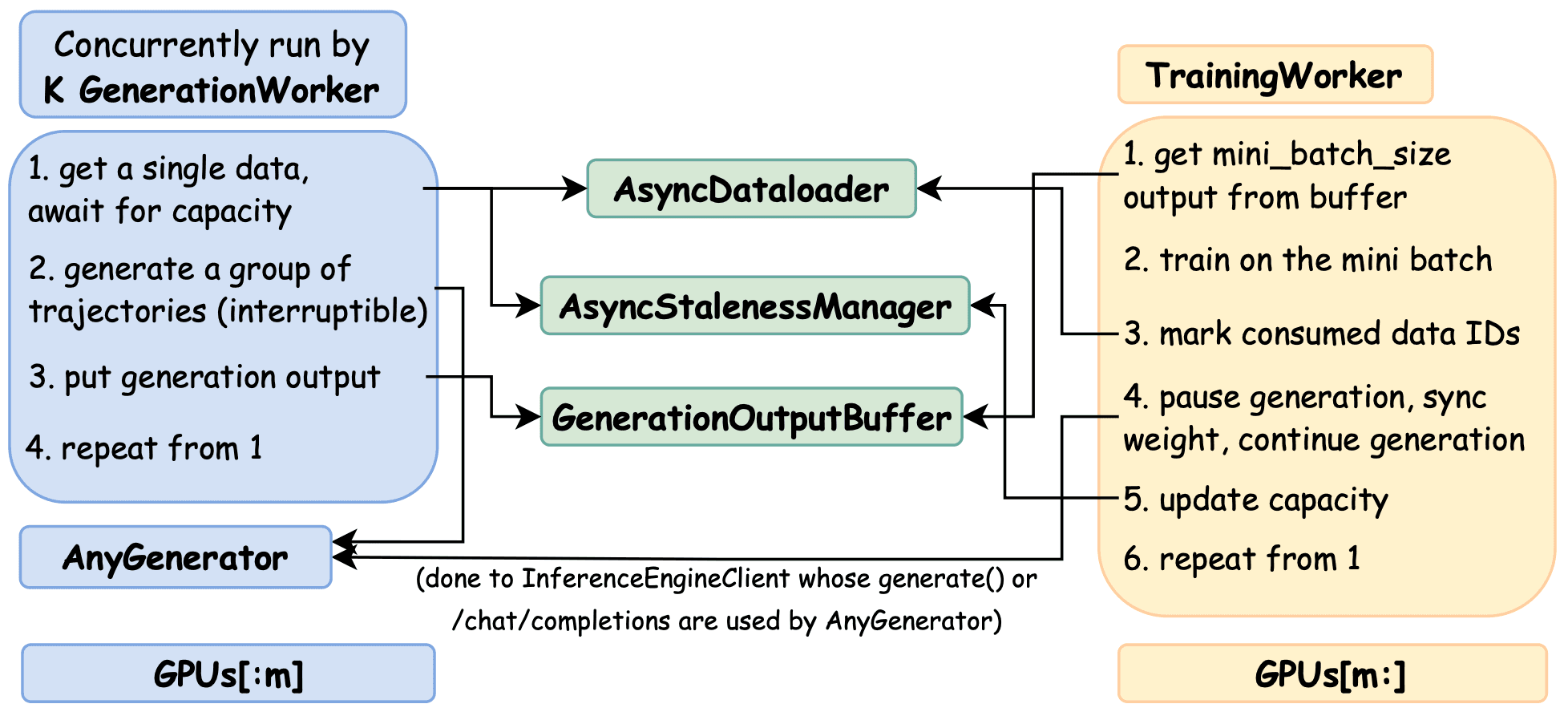
Overview of Fully Async Training in SkyRL
The fully async training is currently only supported for Generators that use /chat/completions. We will support .generate() and /completions soon.
I. What is Fully Async Training?
There are three types of RL training we are interested in here, well-depicted by AReal's Figure 1 and Figure 3.
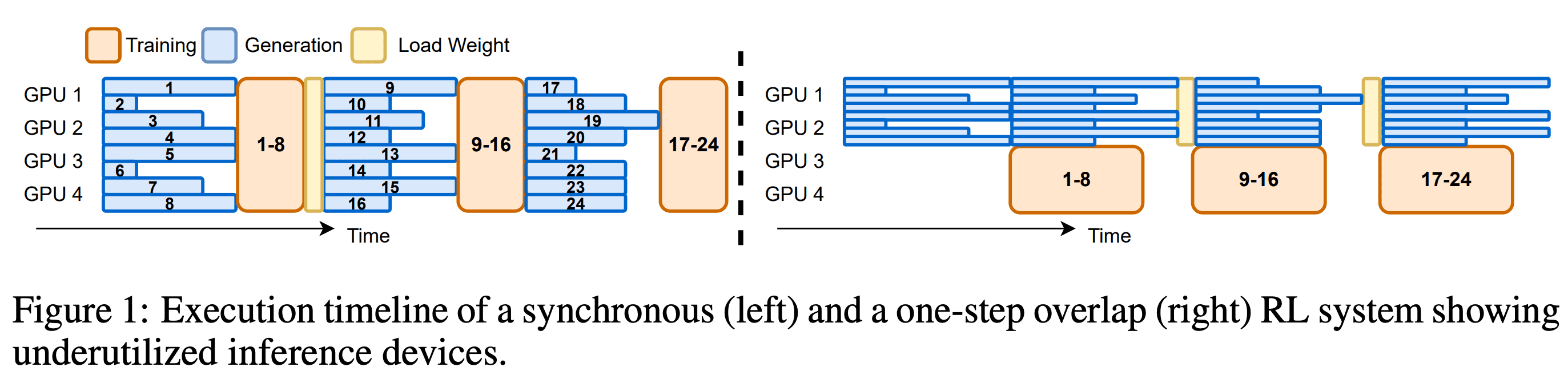
AReal Figure 1: Synchronous Training vs. One-Step-Off Async Training
a. Synchronous Training
In AReal's figure 1 LHS, we have the traditional synchronous training, colocating training and generation on the same set of GPUs.
- Pro: easy to implement and set up. Works for most small-scale tasks like gsm8k. Always on-policy (if
train_batch_size == policy_mini_batch_size). - Con: cannot scale training and generation separately.
b. One-Step Off-Policy Async Training
In AReal's figure 1 RHS, we have one-step off-policy pipelining, also supported by SkyRL and discussed in one_step_off_async.
Here we split the GPUs into two groups, dedicated to training and generation respectively. We first generate a batch of trajectories to start the pipeline, and the trainer always trains on the one-step-stale batch of trajectories (hence one-step off).
- Pro: still relatively easy to implement and setup.
- Con: as shown in the figure, stragglers in a generation batch will stall both generation and training, decreasing throughput. This is especially an issue for long-horizon tasks.
c. Fully Async Training (this page)
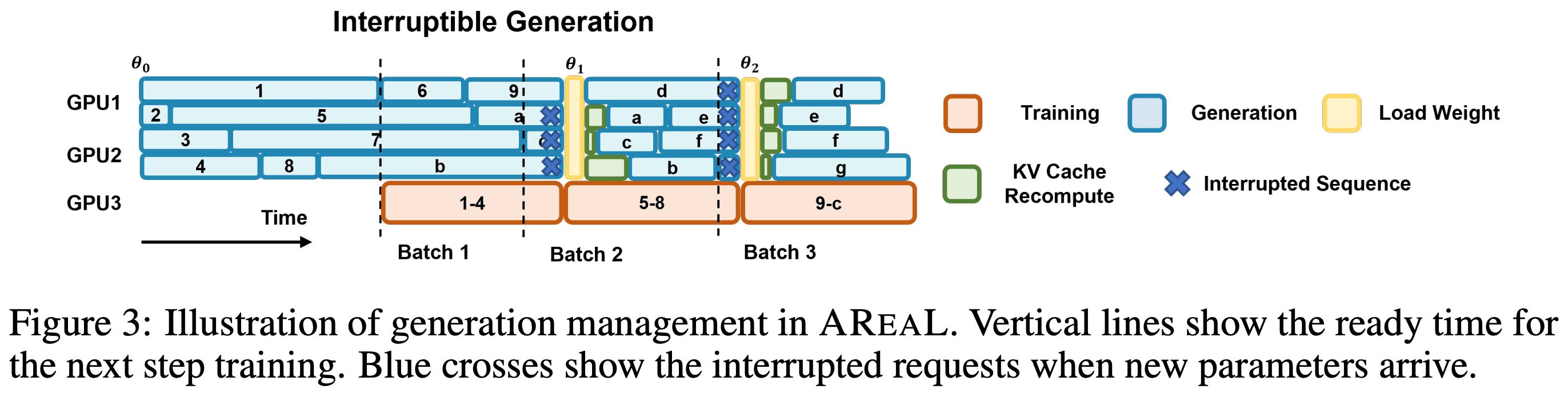
AReal Figure 3: Fully Async Training
Both approaches above suffer from the straggler issues in generation. Fully async training addresses this with in-flight weight update. After the trainer finishes a training step, we: 1) pause the generation of the ongoing trajectories, 2) update the generator weights in-flight, 3) resume generation of the trajectories.
This effectively addresses the straggler issues. While it may sound unintuitive at first (a trajectory can be generated by multiple model versions), it has worked well in practice according to the literature.
II. How to use fully async training in SkyRL?
The fully async trainer class is implemented in fully_async_trainer.py::FullyAsyncRayPPOTrainer, subclassing the synchronous trainer class trainer.py::RayPPOTrainer.
This trainer class is generator-agnostic, meaning it can support any generator that implements the GeneratorInterface interface, including your arbitrary agent harness.
We provide an example script in examples/train/fully_async, where we train Qwen2.5-1.5B-Instruct on GSM8K with the fully async approach.
We break down the usage into two simple steps.
Step 1: Define your main_async.py
Following examples/train/fully_async/main_fully_async.py, subclass the base entrypoint class BasePPOExp:
- Override
get_trainer()to use fully async trainer classFullyAsyncRayPPOTrainer - Override
get_generator()to use your custom generator class. Note that currently we only support generators that use/chat/completions(hence theSkyRLGymHTTPGeneratorused in the example).
Step 2: Config knobs to tune for fully async training
Following examples/train/fully_async/fully_async_run_gsm8k.sh, update the training configuration to use your new entrypoint main_async.py:
uv run --isolated --extra fsdp -m examples.train.fully_async.main_fully_async \
...
For fully async specifically, the following are the main knobs to tune:
-
trainer.policy_mini_batch_size: The mini-batch size for policy training. The trainer triggers a training step whenever the generation workers have generated this many groups of trajectories. -
trainer.fully_async.max_staleness_steps: The maximum off-policy steps allowed for each training batch, trading off between throughput and off-policy bias. See async-staleness-manager for more details.max_staleness_steps = 0is equivalent to synchronous training (despite wasting throughput since we cannot overlap training and generation).
-
trainer.fully_async.num_parallel_generation_workers: The number of generation workers to spawn, where each worker works on a group of trajectories. It should be>= trainer.policy_mini_batch_sizeto avoid wasted throughput, and<= trainer.policy_mini_batch_size * (trainer.fully_async.max_staleness_steps + 1)since it would be wasted due to capacity control. The larger the number, the more throughput, and likely more staleness (and hence off-policy-ness). -
trainer.fully_async.sample_full_batch: Whentrue(requirestrainer.algorithm.zero_variance_filter=true), groups whose rewards have no variance (zero GRPO signal) are dropped rather than loss-masked, and the trainer keeps pulling generated groups until the mini-batch is full of non-zero-variance groups (blocking on generation as needed). This is the async-native equivalent of DAPOdynamic_sampling.type="filter". Dropped groups are marked consumed, so they are skipped (not regenerated) on resume. Because dropping consumes extra prompts per trained step, this makes the per-epoch step count an upper bound rather than exact: when an epoch's prompts are exhausted mid mini-batch, the partial mini-batch is discarded (also marked consumed) and the epoch ends early. Defaults tofalse(zero-variance groups are loss-masked but still occupy a mini-batch slot). -
trainer.fully_async.clear_kv_cache_on_weight_sync: Whether to clear the inference engine KV cache on each weight sync. Defaults tofalsefor fully async training, which reuses KV cache from stale policies during generation — avoiding recomputation at the cost of using slightly stale KV cache. Set totrueto match synchronous RL behavior. Note that prefix-cache blocks are still isolated per policy version bygenerator.use_cache_salt(on by default), so cache is reused within a weight version and not shared across versions.
On GPU placement: first disable colocation of training and generation, then configure how many GPUs to dedicate to training and generation respectively. The following snippet dedicates 4 GPUs to each.
trainer.placement.colocate_all=false \
trainer.placement.colocate_policy_ref=true \
trainer.placement.policy_num_gpus_per_node=4 \
trainer.placement.ref_num_gpus_per_node=4 \
generator.inference_engine.num_engines=4 \
generator.inference_engine.tensor_parallel_size=1
Other restrictions (will be validated by the trainer):
trainer.train_batch_size: Must be set to the same astrainer.policy_mini_batch_size.generator.batched: Must be set tofalseto use non-batched vLLM engines.trainer.algorithm.dynamic_sampling.type: Must be set to"none"to disable dynamic sampling (not supported yet).
Benchmarking generation with a simulated trainer
To benchmark the generation/inference side alone — e.g. router load-balancing policies on a large
model — the trainer step can be simulated, so no policy/critic/ref models are built and no weight
broadcast happens. Each step consumes a mini-batch, sleeps for a fixed duration, then issues
pause/resume generation exactly as a real weight sync would, but skips the broadcast. The
generation-side dynamics (staleness control, capacity gating, rate limiting, pause/resume) remain
faithful. This is typically pointed at already-served endpoints via
generator.inference_engine.external_proxy_url / external_server_urls with
run_engines_locally=false, so generation hits the live deployment directly.
See examples/train/fully_async/main_fully_async_sim.py.
trainer.fully_async.simulate_training: Enables the simulated trainer (FullyAsyncTrainerSim).trainer.fully_async.simulate_training_step_seconds: Wall-clock seconds the simulated training step sleeps, standing in for forward/backward/optimizer. Defaults to30.0.trainer.fully_async.simulate_weight_sync_seconds: Wall-clock seconds generation stays paused to stand in for the (skipped) weight broadcast.0.0means pause then immediately resume.
Because no models are built, simulate_training=true requires trainer.eval_interval,
trainer.ckpt_interval, and trainer.hf_save_interval to all be <= 0,
trainer.update_ref_every_epoch=false, and resumption to be disabled.
III. Design and Implementation of Fully Async Training in SkyRL
0. Overview
The high-level control logics of fully async training in SkyRL are shown in the figure below.
Systems Diagram of Fully Async Training in SkyRL
There are 5 core components:
- K
GenerationWorker: workers that produce the trajectories. Each is simply anasyncio.Taskthat runsAnyGenerator.generate(). K istrainer.fully_async.num_parallel_generation_workers.AnyGeneratormeans that it works with any generator. TrainingWorker: simply a single thread that runs the training loop.GenerationOutputGroupBuffer: a buffer that stores the generated groups of output.AsyncDataloader: a thin wrapper of the dataloader, polled by the generation workers to get data.AsyncStalenessManager: a controller that manages the staleness control to ensure no trajectory is dropped for being too stale.
Note that all the control logics pertain to a single epoch. We do not do any cross-epoch asynchrony.
Besides, we define group as the smallest unit of data in the control logic. A group (in GRPO sense)
is a set of generator.n_samples_per_prompt number of trajectories generated for the same prompt.
1. K Generation Workers
Generation workers are virtual workers, each is simply an asyncio.Task that runs generator.generate()
for a group of trajectories. There is only one generator instance (e.g. SkyRLGymGenerator) and one
physical RemoteInferenceClient in the back serving the actual LLM inference.
Each generation worker runs the following steps in a while loop:
- Get a single data from the
AsyncDataloader. Might await on staleness control based onAsyncStalenessManager(i.e. too many data accumulated in the buffer and a new generation will result in staleness violation). - Generate one group of trajectories. Can be single-turn or multi-turn,
SkyRLGymGeneratoror your own generator. - Enqueue the generated group to the
GenerationOutputGroupBuffer. - Repeat from step 1 until the
AsyncDataloaderis exhausted for this epoch.
2. Training Worker (i.e. the training loop)
While we call it a "training worker", it is simply the single thread that runs the training loop.
It follows the following steps in a for-loop over the number of steps per epoch:
- Get precisely
trainer.policy_mini_batch_sizegroups from theGenerationOutputGroupBuffer. The staleness controller enforces a global capacity bound that aims to keep batches withintrainer.fully_async.max_staleness_stepssteps stale. However, it does not strictly guarantee it. See async-staleness-manager for more details. - Train on the generated groups.
- Mark the data that we used to train as "consumed" to the
AsyncDataloader, so that when we resume training from a checkpoint, we know what data has been trained on and hence can be skipped. - Make
AnyGenerator(really theRemoteInferenceClientin the back): pause generation, sync weights, resume generation. Note that this operation is agnostic to what the generator is doing. It can either be in the middle of a/chat/completionsgeneration, or interacting with the environment. - Update the global step and hence the capacity controlled by the
AsyncStalenessManager, potentially unblocking generation workers stuck on step 1 -- as they can now generate new data that will not be as stale as before. - Repeat from step 1 until the epoch is done.
3. Generation Output Group Buffer
The generation output group buffer is simply a asyncio.Queue that stores the generated groups of output.
It is enqueued by the generation workers, and dequeued by the training worker.
4. Async Dataloader
The async dataloader is a thin wrapper around the torchdata.stateful_dataloader.StatefulDataLoader we use in sync training or one-step-off async training. It is implemented to satisfy the following requirements of fully async training:
-
Thread-safe dataloader iteration with a lock, as there are multiple concurrent generation workers polling data.
-
Records consumed data UIDs for checkpointing to avoid training on the same data upon resuming.
-
Do proper trimming of the dataset to ensure that the dataloader always returns a full mini-batch.
- We cannot rely on
drop_lastbecause the batch size is 1 in fully async training (since each generation worker works on a single group at a time). - We also cannot trim the
train_datasetbefore building the dataloader, because it will affect the random permutations of the dataset, and the data order of async training will be different from synchronous training. However if we keep the datasets the same, even if the batch size of the dataloader is different, the permutation is the same after aggregating the batches of size one to the same size as the mini-batch size.
- We cannot rely on
The AsyncDataloader is used in the following cases:
- The generation workers poll data from the
AsyncDataloaderto generate trajectories. - The trainer marks the data that has been used to train as "consumed" to the
AsyncDataloader - Upon checkpointing, save the consumed data UIDs along with other checkpointing states, so that when we resume training from a checkpoint, we know what data has been trained on for this epoch and hence can be skipped.
- Reset to the initial state at the end of each epoch.
5. Async Staleness Manager
The async staleness manager makes sure generation never outruns training beyond the user-specified
bound trainer.fully_async.max_staleness_steps. It enforces a simple, global capacity rule so
that groups waiting in the buffer or currently being generated are never "too stale" relative to the
latest trained model.
Modeled after AReal's StalenessManager (paper §5.1), our controller maintains a small set of global counters and enforces a simple capacity inequality.
Definitions
- Consumed by trainer: groups that have already been used for updating the model weights.
current_global_step: the model version currently being worked on; the model has completedcurrent_global_step - 1updates.mini_batch_size = B: number of groups consumed per training step.max_staleness_steps = S: the maximum allowed difference between when a group was scheduled to generate, and the step that trains on it.accepted: total number of groups that finished generation (either already consumed or waiting in the buffer). This includes all the generation outputs throughout the entire training process. Thus, this number is strictly increasing.running: number of groups currently being generated by workers.submitted: total number of groups submitted to workers (used for logging).
Capacity control
At current_global_step, the maximum number of groups the system may have progressed
since the very beginning of the training (counting both completed and in-flight generation) without violating the staleness bound is::
capacity = (S + current_global_step) * B
To stay within the bound, the manager guarantees::
accepted + running <= capacity
Intuition:
- Of the capacity,
(current_global_step - 1) * Bhave already been consumed by training. - The remainder is the "headroom" the system can be ahead of training: items already in the buffer (
accepted - consumed) plus items currently being generated (running). - Each time training finishes a step,
current_global_stepincreases by 1, expanding capacity byBand unblocking generation.
Operationally, a generation worker:
- Acquires capacity before starting a new group via
await AsyncStalenessManager.acquire_submission_slot(). This blocks untilcapacity - (accepted + running) > 0is satisfied. - When the group finishes generation and is enqueued, it calls
await AsyncStalenessManager.on_rollout_accepted()to convert one running slot into an accepted unit.
After each training step, the trainer increments the version and calls
await AsyncStalenessManager.notify_capacity_change(current_global_step), which increases capacity and wakes up blocked workers.
Per-sample staleness vs capacity bound
The capacity inequality keeps generation from outpacing training by more than S steps in aggregate. It does NOT strictly guarantee that every trajectory group will be trained within S steps of when it was scheduled. In rare cases (e.g., very long rollouts), a trajectory group may complete after more than S steps have elapsed while the system as a whole still satisfies the capacity constraint. However, in steady state, staleness remains within the configured budget of max_staleness_steps.
Possible ways for handling such rare groups that violate the S bound:
-
Current behavior: Still accept the trajectory group for training, but log the staleness metrics with a warning.
- Matches PipelineRL's behavior and AReal's default behavior.
-
Drop the trajectory group using
AsyncStalenessManager.on_rollout_rejected()(not supported yet but should be hackable)- Matches AReal's behavior if the
should_accept_fnis based on per-sample staleness.
- Matches AReal's behavior if the
-
Drop the trajectory group and resample. Would require logics to
AsyncDataloaderto requeue the data. (not supported yet but should be hackable)
Checkpointing semantics
When saving a checkpoint, only trainer-consumed state is recorded. On resume, we set accepted := consumed (and do not restore those that were running or about-to-be-consumed in the buffer), which preserves the capacity invariant without reintroducing stale or partially generated work.
With sample_full_batch, consumed state is split into trained and filtered (dropped) UIDs, both persisted to the checkpoint. The do-not-redraw set is their union, so dropped (and end-of-epoch discarded) prompts are skipped — not regenerated — on resume, while only trained UIDs count toward completed steps (accepted == trained == (global_step - 1) * mini_batch_size).
AsyncStalenessManager is a deliberate design choice. One could instead over-generate and drop groups that are too stale at training time. We prefer proactive admission control to avoid wasted compute and simplify buffer management. With very small S, the system may stall more often; increasing S trades off stricter on-policy-ness for higher throughput.
Our capacity formula uses current_global_step directly (no +1) because in SkyRL current_global_step denotes the version being worked on, whereas AReal's derivation counts completed versions. This matches the implementation in fully_async_trainer.py.
IV. More Implementation Details
1. How is in-flight weight update implemented by the inference engines?
The main reason why we can support fully async training for any generator (single-turn or multi-turn) is that, the in-flight weight update is implemented by the inference engines, not the generator / agent harness that the users use.
To implement in-flight weight update, we need to change the semantics of /chat/completions (or .generate(), /completions) from "generate an output for a given input" to "generate an output for a given input, while possibly updating the model weights in the middle".
That is, when the weight update is happening, the generator / agent harness has no clue that this is happening
underlyingly as the /chat/completions endpoint is simply blocked and not returning.
This design makes the implementation of fully async training agnostic to the generator / agent harness as the trajectory could be doing anything when weight update is happening -- in the middle of a output generation or in the middle of an interaction with the environment (where the next output generation will simply be blocked until the weight update is finished).
We implement this semantics by implementing SkyRL's RemoteInferenceClient to keep calling the underlying
inference engine's /chat/completions endpoint in a while loop, until the finish reason is not an abort.
Upon RemoteInferenceClient.pause_generation(), we abort all the in-flight /chat/completions requests,
and save the partial results, waiting to be re-fed into the underlying inference engine as a new
/chat/completions request when RemoteInferenceClient.resume_generation() is called.
See the following two PRs for more details:
2. How is checkpointing supported
The main challenge of performing checkpointing and resuming in fully async training is that, the dataloader's state is not reliable (which is usually used to save checkpoint in sync training). While some data could be retrieved, upon checkpointing, we have no clue whether a data has already been trained or not.
To address this, our AsyncDataloader records the data UIDs that have been consumed by the trainer. Upon resuming from a checkpoint, we load the consumed data UIDs and skip the data that has already been trained. Therefore, the state of the dataloader is not used at all.
V. Future Work
- Validate with correct algorithmic offset (importance weighting)
- Support fully async training for
.generate()and/completionsas well. - Validate speedup and results with DAPO.
- How to make fully async training reproducible (at the cost of some performance degradation)?
References
- AReal: https://arxiv.org/abs/2505.24298v3
- PipelineRL: https://arxiv.org/abs/2509.19128v2
- ScaleRL: https://arxiv.org/abs/2510.13786