Megatron Backend for 5D Parallelism
This page covers the megatron backend.
SkyRL supports NVIDIA's Megatron-Core library as an RL training backend, inheriting support for 5D parallelism (tensor+sequence, pipeline, context, expert, and data parallelism), and optimized performance for large scale models.
We provide example scripts for running efficient large scale MoE training with models like Qwen3-30B-A3B using Megatron in the examples/megatron directory.
For details on configuring the Megatron backend, and enabling checkpointing, see the configuration API reference and the Megatron checkpointing guide.
When to use the Megatron backend
SkyRL supports efficient data-parallel training with the FSDP backend, with support for Ulysses sequence parallelism for long context training. The Megatron backend is useful to stack additional parallelism strategies (TP, PP, EP) on top of data and sequence/context parallelism. This is helpful both for fitting larger models into memory and for training throughput for MoE models (with EP). The Megatron backend is thus useful for efficient training of small MoE models like Qwen3-30B-A3B as well as large-scale training with large models such as Qwen3-235B-A22B and/or large datasets. For resources on understanding different parallelism strategies, see parallelism-resources.
Comparison to FSDP
We show performance comparisons for the Megatron and FSDP backends on the Search-R1 task (4K max context length) for various model sizes in the table below. Training speed for small scale dense models with Megatron is similar to the FSDP backend, and Megatron enables high throughput training for larger scale MoE models where FSDP is no longer feasible as the only parallelism strategy.
| Model | Backend | Compute | Policy Training Time (s) | Forward Pass Time (s) | Avg Num Tokens |
|---|---|---|---|---|---|
| Qwen2.5-3B-Instruct | Megatron | 8xH100 | 48 | 39 | 658 |
| Qwen2.5-3B-Instruct | FSDP | 8xH100 | 42 | 28 | 658 |
| Qwen2.5-7B-Instruct | Megatron | 8xH100 | 93 | 46 | 819 |
| Qwen2.5-7B-Instruct | FSDP | 8xH100 | 100 | 33 | 834 |
| Qwen3-30B-A3B | Megatron | 4x8xH100 | 189 | 145 | 1158 |
For all experiments, we used a train batch size of 512. For Qwen2.5 3B and 7B Megatron was configured with only data parallel=8. For Qwen3-30B-A3B Megatron was configured with DP=4, TP=2, and EP=8, and the FSDP backend was unable to complete a training step due to memory constraints. All statistics shown were averaged over the first 10 steps of training. Micro batch sizes were tuned to be the max possible for each backend.
A script for running the Qwen3-30B-A3B experiment can be found here. Additionally, we provide a script for running basic GSM8K training on Qwen3-235B-A22B with Megatron here. Note that although training at 100B+ scale using Megatron is currently possible, we are in the process of further optimizing peformance.
For more details on configuring the Megatron backend, and enabling checkpointing, see the configuration API reference, and the Megatron checkpointing guide.
Installation
Setting up the Docker image
To get started, you can follow the instructions for installing via Docker in the Installation Guide page, but using the novaskyai/skyrl-train-ray-2.57.0-py3.12-cu13.0-megatron image instead of the default image.
This ensures that the necessary dependencies needed for Megatron are installed and don't need to be built on each node for each run, which can be time consuming. Previously, we recommended setting PYTHONPATH to the location of TransformerEngine installation, but this is no longer necessary.
In order to use flash attention with the megatron backend, you must use `flash_attn` version `2.7.4.post1` or lower for compatibility with `TransformerEngine==2.7.0`.
This is handled in the `pyproject.toml` file for the `mcore` extra.

## Configuration

We provide the following options for fully configuring the Megatron backend, exposing the underlying Megatron optimizer, DDP, and model config objects
for advanced users to fully take advantage of all of Megatron-Core's feature flags. For the full field list, defaults, and per-field documentation, see [`MegatronConfig`](/docs/api-ref/skyrl/config) in the configuration API reference.

```yaml title="trainer.policy.megatron_config (available fields)"
tensor_model_parallel_size: 1
pipeline_model_parallel_size: 1
context_parallel_size: 1
expert_model_parallel_size: 1
expert_tensor_parallel_size: null

ddp_config: # pass-through config to Megatron's `DistributedDataParallelConfig` object
  # https://github.com/NVIDIA/Megatron-LM/blob/core_r0.13.0/megatron/core/distributed/distributed_data_parallel_config.py#L8
  ...
optimizer_config_kwargs: # pass-through kwargs to Megatron's `OptimizerConfig` object
  # any overlapping arguments with those we attempt to resolve in trainer.policy.optimizer_config will be overridden by the values here
  # https://github.com/NVIDIA/Megatron-LM/blob/core_r0.13.0/megatron/core/optimizer/optimizer_config.py#L12
  ...
transformer_config_kwargs: # pass-through kwargs to the Megatron's `TransformerConfig` object
  # https://github.com/NVIDIA/Megatron-LM/blob/core_r0.13.0/megatron/core/transformer/transformer_config.py#L33
  ...
lora_config:
  # see: https://docs.nvidia.com/nemo/megatron-bridge/0.2.0/apidocs/bridge/bridge.peft.lora.html for details - currently "lora" and "canonical_lora" are supported
  lora_type: "lora"
  # with TP > 1, lets the LoRA adapters on linear_qkv / linear_fc1 contribute to the input gradient under
  # sequence parallelism (https://github.com/NVIDIA-NeMo/Megatron-Bridge/issues/6453). Only for lora_type "lora".
  sequence_parallel_input_regather: true
# flag to manually empty torch's cuda cache between the forward/backward pass and the optimizer step
# this will free reserved but unallocated memory, and can help avoid OoMs in the optimizer.
# null (default): on, unless the optimizer is fully offloaded to CPU (optimizer_cpu_offload with
# optimizer_offload_fraction 1.0), where emptying only makes the next forward map the memory again.
empty_cuda_cache: null

```

These default values can be overridden by passing in the corresponding arguments to `trainer.policy.megatron_config` in the launch script.

### Sizing the parallelism dimensions

The parallel sizes must satisfy the following rules:

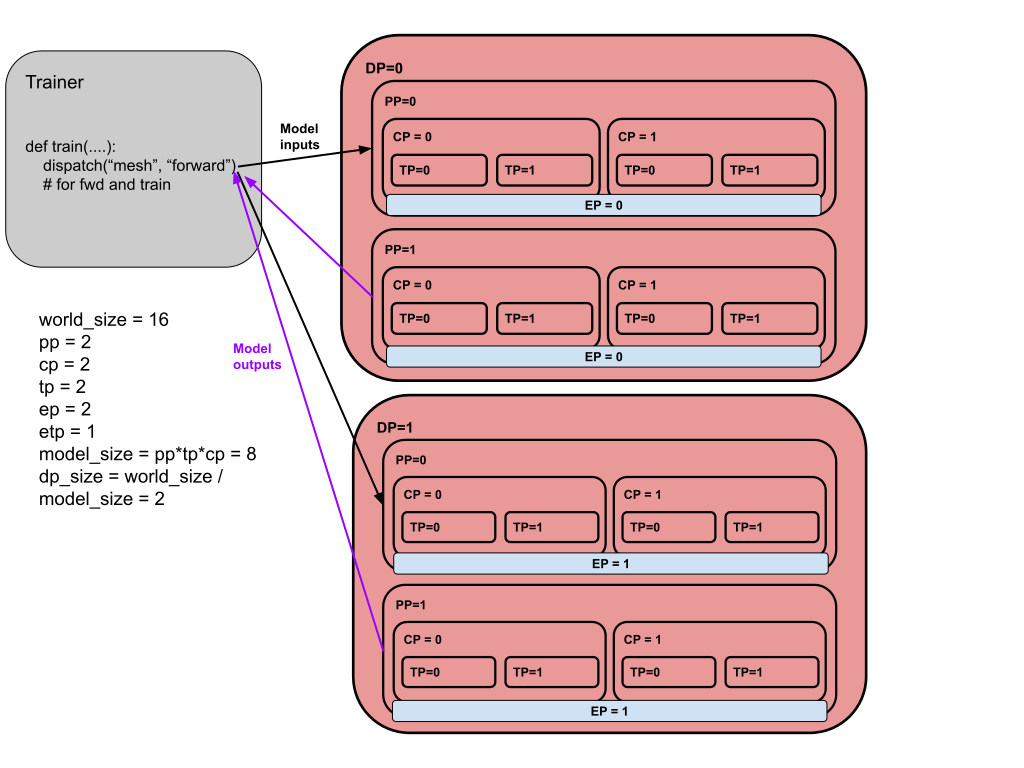
- `model_size = pp_size * tp_size * cp_size`
- `dp_size = world_size / model_size`
- `world_size % (pp_size * ep_size * etp_size) == 0`

The last rule means that `ep_size * etp_size` can scale independently of `tp_size * cp_size`, and
can go across data parallel ranks.

Two things worth noting when picking these values:

- Megatron sequence parallelism (unrelated to Ulysses `sequence_parallel_size`) is enabled
  automatically whenever `tensor_model_parallel_size > 1`.
- `expert_tensor_parallel_size` resolves to `tensor_model_parallel_size` when left as `null`.
  Setting it to `1` is recommended for best performance when `expert_model_parallel_size > 1`.

### Optimizer-state dtypes

`optimizer_config_kwargs` can set optimizer-state dtypes from YAML:

```yaml
optimizer_config_kwargs:
  use_precision_aware_optimizer: true
  exp_avg_dtype: bf16
  exp_avg_sq_dtype: fp8
  main_params_dtype: fp32
```

Accepted dtype names are case-insensitive: `fp32` (`float32`, `float`), `fp16` (`float16`, `half`),
`bf16` (`bfloat16`), and `fp8` (`float8`, `uint8`). `fp8` maps to `torch.uint8`, matching
TransformerEngine optimizer state storage.

Field-specific checks:

- `main_params_dtype` (master weights): `fp32`, `fp16`
- `exp_avg_dtype` / `exp_avg_sq_dtype`: `fp32`, `fp16`, `bf16`, `fp8`

<Callout type="warn">
`optimizer_config_kwargs.use_precision_aware_optimizer=true` can cause checkpointing to fail. See:
https://github.com/nvidia/megatron-lm/issues/1820. We recommend leaving this setting to `false`.
</Callout>

## Parallelism Resources

Understanding and configuring parallelism strategies for large models can be challenging.
Some helpful resources for understanding and tuning large scale parallelism strategies can be found at the [Huggingface Ultra-Scale Playbook](https://huggingface.co/spaces/nanotron/ultrascale-playbook?section=finding_the_best_training_configuration),
the [The Mesh Parallelism Zoo](https://blog.ezyang.com/2025/08/the-parallelism-mesh-zoo/), and the [Visualizing 6-D Parallelism](https://main-horse.github.io/posts/visualizing-6d).

Below, we show a diagram displaying how all 5 parallelism strategies - tensor, pipeline, context, expert, and data parallelism - can be utilized in SkyRL, as well as how dispatching data across these parallel groups works.